
XFS for Mac: Compatibility, Licensing & Constraints
XFS for Mac: Compatibility, Licensing & Constraints
Plugging an XFS drive into a Mac does not give you access to it. macOS ships no component that provides XFS read/write support, so an XFS-formatted external SSD, a Linux server disk, or a USB drive used in a Linux workflow does not mount the way an APFS or exFAT volume does.
The practical question for a buyer is therefore not whether XFS for Mac products exist — at least two open-source projects and one commercially licensed product are documented — but which option satisfies the constraints of a specific Mac, a specific macOS release, a specific XFS workload, and a specific procurement and security policy.
This reference sets out those constraints in order: operating system and chip coverage, read/write capability, installation and security requirements, licensing cost, and support terms. Vendor claims are attributed as vendor claims. The comparison figures come from published product and platform documentation.
Problem Definition: The Native XFS Gap on macOS
macOS native support covers a limited set of file systems. CrossDriver describes that boundary in its own solution documentation: native macOS support allows reading NTFS files but not writing them, and it does not recognise Ext-series partitions. XFS sits on the same side of that line — an XFS volume formatted on Linux is not handled by the operating system the way a Mac-native volume is.
Four consequences follow, and each is a condition buyers end up evaluating:
- Cross-system transfer requires a detour. Files are copied to an intermediate medium and then copied again, which adds steps and elapsed time to every exchange.
- Reformatting destroys existing data. Converting a drive to exFAT or APFS erases what is already on it. CrossDriver frames this as the risk its product is designed to avoid, not as a recommended practice.
- Shared disks across operating systems get awkward. When one external drive has to serve Windows, Linux and Mac machines, the exchange process stops being a simple drag-and-drop.
- The drive stays unreachable until a driver is installed. Until then, the volume is physically connected but functionally out of scope for the Mac.
These are the boundary conditions to weigh against any XFS driver, not just one vendor's.
Industry Background: Why XFS on Mac Is a Constraint Problem
XFS is a Linux file system built for large files and sustained I/O throughput. When an XFS disk is attached to a Mac, the problem shifts from file-format compatibility to driver architecture: who supplies the read/write logic, how that driver loads, and how it interacts with the macOS security model.
Apple's platform documentation is explicit about the second point. Kernel extensions have broad system access. On macOS 11 and later they cannot be loaded into the kernel on demand — they require administrator approval and a restart of the Mac, and they may require secure boot mode to be set to Reduced Security. Apple recommends system extensions instead where possible.
Apple's developer documentation describes the direction of travel: DriverKit is positioned as a fully modernised replacement for IOKit for creating device drivers, and system extensions and drivers built with DriverKit run in user space, where they cannot compromise the security or stability of macOS.
Three buyer-facing constraints follow from this platform guidance:
- Chip and OS coverage is a real filter. Intel Macs and Apple Silicon Macs do not behave identically at the driver layer, and each macOS release changes what is permitted.
- Installation is a process, not a double-click. Administrator approval, a restart, and possibly a security-mode adjustment can all be part of the deployment package.
- Compatibility has to be re-verified, not assumed. Every new macOS release is a fresh compatibility question for any driver vendor.
Why this matters for procurement: a vendor that states generic “Apple Silicon support” without a model-by-model and macOS-version compatibility matrix has not given a buyer enough information to plan a rollout. The matrix, not the marketing line, is the decision document.
Detailed Solution: What CrossDriver XFS for Mac Provides
CrossDriver Limited is a Hong Kong-based company that develops kernel-level and system-level cross-platform software, with a product line covering NTFS, Ext4 and XFS file system drivers for macOS. Its company profile records 15 years of macOS driver development experience, 20 years of Windows development experience and 15 years of Linux development experience across the R&D team.
CrossDriver XFS for Mac is the XFS product in that line. According to the vendor's product description, it is a lightweight macOS utility that provides full read/write control over Linux XFS disks.
Documented product facts
- Licence and price: CrossDriver XFS for Mac is offered as a lifetime licence at USD $59.95, compatible with Apple computers using Intel, M1, M2, M3, M4 and M5 chips.
- macOS coverage: the vendor states support from macOS 10.13 High Sierra up to the latest macOS releases it lists, with optimisation for Apple Silicon.
- Access model: XFS drive contents can be edited, copied and deleted directly in Finder, and disks can be mounted or unmounted quickly from the macOS menu bar.
- No reformatting: the existing file system on the drive is preserved, and data already on the disk is not erased as part of enabling access.
- Driver layer: the driver runs at the macOS kernel layer rather than as a FUSE user-space tool. CrossDriver states that its kernel-level drivers deliver more than 5× faster transfer speeds compared with FUSE-based user-space tools.
Technical capabilities behind those facts
The published technology stack includes C/C++, macOS Kernel Extension, Objective-C, Swift, file system protocol parsing, disk I/O scheduling, authorisation verification services and automated test scripts.
CrossDriver describes specific development capabilities that matter when evaluating a driver: development and signature adaptation of macOS kernel extension drivers; development of disk mounting management and UI menu bar components; development of disk abnormal unmount validation and file corruption risk mitigation mechanisms; and protocol parsing with implementation of read/write logic for NTFS, Ext2, Ext3, Ext4 and XFS file systems.
The abnormal-unmount validation item is worth flagging for evaluation. A drive that is unplugged or loses power mid-write is the scenario where file corruption becomes possible, and a driver that detects the abnormal unmount and handles the next mount differently is addressing data integrity rather than only throughput.
Where the evidence stops
CrossDriver is the vendor, and the capability statements above are vendor statements. No independent benchmark comparing CrossDriver XFS for Mac against open-source implementations on identical hardware and filesystem conditions was identified in the research behind this article. That gap should be treated as a verification task, not as a reason to discount the product.
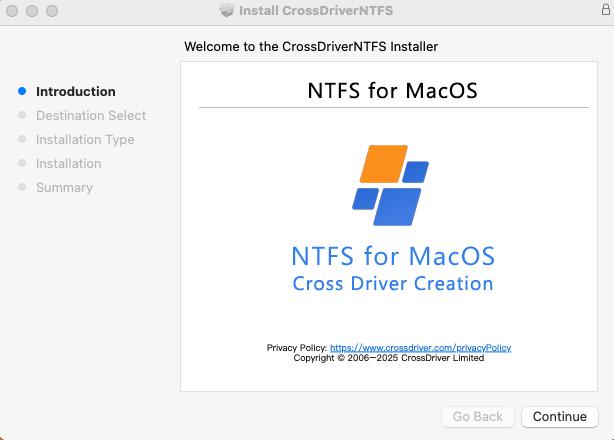
Step-by-Step Breakdown: Deploying an XFS Driver on a Mac
CrossDriver publishes a staged deployment sequence. The stages below follow that sequence and are written so they can be used as a checklist against any XFS driver, not only this one.
Stage 1 — Pre-installation environment check
Confirm three things before downloading anything: the Mac's chip architecture (Intel or Apple Silicon), the exact macOS version, and whether an administrator account is available. CrossDriver's documented flow has the software detect system version, permission status and device compatibility automatically, and produce a pass, warning or fail result before installation proceeds.
Stage 2 — Installation and licence activation
The signed installer runs a deployment wizard, the user authorises with an administrator password, and the kernel driver components install. On Apple Silicon Macs, enabling kernel extension permissions may require entering Recovery Mode, after which the driver extension is approved in System Privacy & Security settings. Activation completes online verification and device binding.

Stage 3 — Volume identification and mounting
Connect the XFS drive to a USB or Thunderbolt port. The driver identifies the partition and file system, then completes a system-level mount. If recognition fails, mounting can be triggered manually, and a failure should produce a clear error rather than a silent no-op.
Stage 4 — File operations and data transfer
With the volume mounted, Finder becomes the working surface: copy, move, edit, delete and batch-sort operations. Two operational rules apply regardless of vendor — keep the physical connection stable and avoid hot-unplugging during transfer, and back up critical data before batch operations.
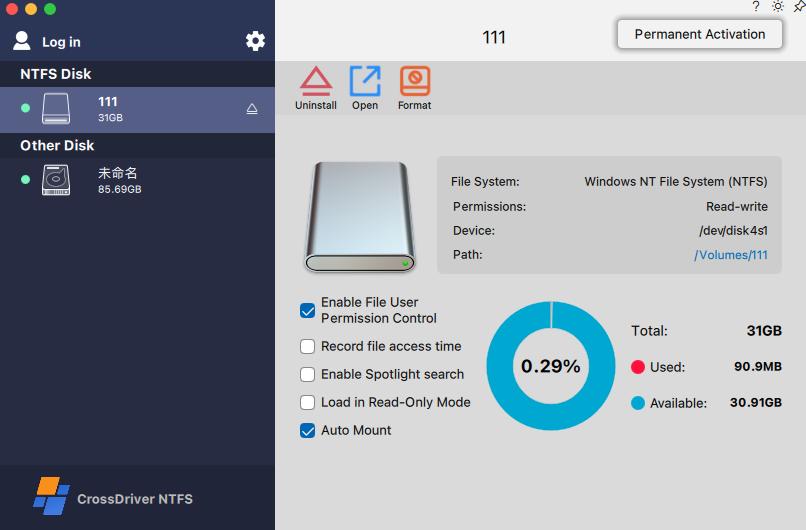
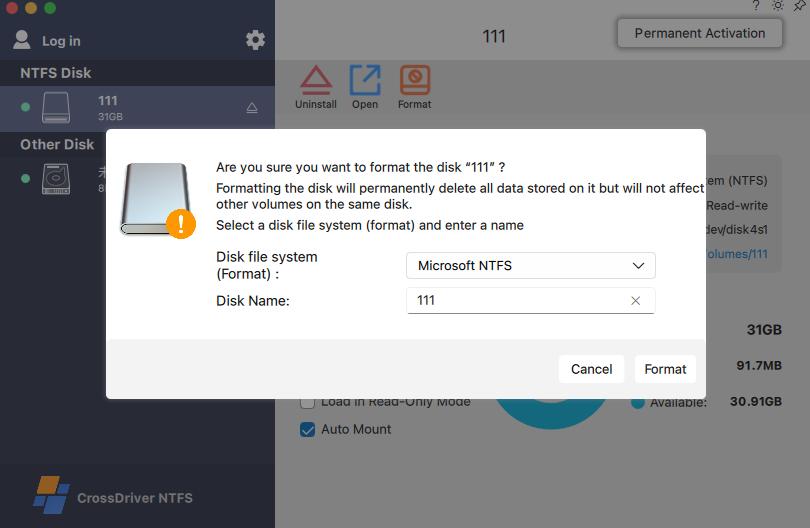
Stage 5 — Disk management and configuration
Driver settings typically cover auto-mount toggles, read-only mode, disk health checks, formatting with risk warnings, and a safe-eject mechanism that releases macOS system resources properly. CrossDriver lists each of these as part of its disk management panel.
Use Cases: Where XFS on Mac Actually Gets Used
XFS access on macOS is a specialist requirement, and the scenarios in which it appears are consistent.
Media production and design studios
A media drive formatted on a Windows or Linux editing system needs to be read, written and modified on a Mac without a copy step. CrossDriver's application scenario material describes exactly this pattern for film and video and design studio workflows.
IT operations
Debugging a Linux server drive, or reading and writing an Ext4-formatted NAS drive, from a Mac laptop. CrossDriver lists IT information operations and maintenance among its served industries.
Engineering and R&D workstations
R&D teams running Mac laptops need direct write access to engineering drawings and simulation data stored on Linux-format external drives. This is the scenario behind CrossDriver's published deployment case at a high-end equipment manufacturing R&D centre, where external drives in Ext4, XFS and NTFS formats were read-only natively on Mac.
Multi-system home or small-studio storage
One external drive shared offline across Windows, Linux and Mac machines, where reformatting is not an option because the data already on the drive matters.
Post-upgrade recovery of capability
After a major macOS version update, previously working cross-platform read/write access has to be restored. CrossDriver's service scope explicitly includes version updates and upgrades with compatibility patches for newer macOS versions.
Documented deployment outcome
CrossDriver's published case record describes a three-week deployment of its commercial driver suite across a manufacturing R&D centre's Mac workstations, covering NTFS, Ext4 and XFS access, with a backend licence management console for centralised terminal licensing and driver status monitoring. The project reported the following outcomes: cross-storage file read and write waiting time reduced by 72%, intermediate file version copy operations cut by 90%, disk read/write error rate reduced from 12% to 0.3%, and storage-related IT tickets reduced by 65%. These are the customer project's reported results, not an independently audited benchmark.
Comparison: Documented XFS Options for macOS
The table below compares the three XFS-on-macOS options for which published documentation was identified. It compares documented attributes only. The three are not equivalent products, and no shared performance test protocol was found for them.
| Attribute | CrossDriver XFS for Mac | fuse-xfs (karan-vk) | xlinuxfs (HuanchuanTech) |
|---|---|---|---|
| Licence model | Commercial, lifetime licence at USD $59.95 | Open source | Open-source project |
| Underlying approach | Kernel-layer driver product line; vendor technology stack lists macOS Kernel Extension | Requires macFUSE | macOS app plus FSKit file-system extension; project states no kernel extension and no macFUSE |
| XFS read/write | Full read/write control per vendor description | Full write support stated from v2.0.0 | XFS listed among supported formats |
| macOS versions | macOS 10.13 High Sierra through the releases the vendor lists | macOS 11.0 and later | Not stated in the project description |
| Chip support | Intel and Apple Silicon M1–M5 | Updated for Apple Silicon | Apple Silicon and Intel, per project statement |
| Desktop workflow | Edit, copy and delete in Finder; mount/unmount from the menu bar | Access through a macFUSE mount | Mac app interface per project description |
| Commercial support | Knowledge base, online tickets, email support, remote diagnostics, version updates | Project maintainers | Project publisher |
Three reading notes for this table:
- CrossDriver XFS for Mac is the only commercially licensed option among the three. The other two are open-source projects, and their support model follows from that.
- Historical sources describe XFS on macOS as read-only. That description predates the 2024 revision of fuse-xfs, which states full write support for XFS V5, and it does not reflect the current documented capability set.
- Architecture is not disclosed for every product. The xlinuxfs project describes an FSKit approach with no kernel extension; CrossDriver's published materials list macOS Kernel Extension within its technology stack. Buyers should confirm the actual driver architecture directly with any vendor rather than inferring it.
Licensing and Cost Constraints
Cost is the simplest part of the evaluation and the part most likely to be misread.
- Product price: the CrossDriver XFS for Mac lifetime licence is listed at USD $59.95.
- Licence type: a lifetime licence, not a subscription, per the published product listing.
- Enterprise scale: CrossDriver supports both individual standalone licensing and enterprise bulk licensing, including batch authorisation activation and centralised authorisation queries.
- Delivery: online delivery through the vendor's own platform, which the company profile describes as supporting online payments in more than 170 countries and regions.
What is not stated in the published materials is equally relevant to a procurement file: refund policy, upgrade pricing for future major versions, and any formal enterprise service-level commitment. Those are questions to put to the vendor before a bulk purchase, not assumptions to carry into it.
Security and Deployment Constraints
Any XFS driver on a modern Mac runs into Apple's platform rules. The constraints below come from Apple's documentation, not from any product claim, and they apply to the deployment plan rather than the purchase decision alone.
- Administrator approval and restart. Kernel extensions on macOS 11 cannot be loaded on demand; they require administrator approval and a restart of the Mac.
- Reduced Security may be required. Apple notes that relevant kernel-extension deployments may require secure boot mode to be set to Reduced Security.
- Apple recommends system extensions where possible. Apple's guidance favours system extensions over kernel extensions where the choice exists.
- Signed and adapted drivers. CrossDriver lists development and signature adaptation of macOS kernel extension drivers as a capability, along with the M-chip kernel extension enablement guidance that enterprise rollout teams need.
For an IT team planning a rollout across multiple Macs, the practical checklist is: verify the signing and approval path end to end on one machine, confirm how the licence binds to hardware, and decide in advance what the rollback procedure is if a macOS update breaks compatibility.
Evaluation rule: test the driver on the exact hardware and macOS version you plan to deploy, with a drive formatted the way your production drives are formatted. A generic compatibility statement is not a substitute for that test.
Frequently Asked Questions
1. Which macOS versions and Apple Silicon chips can run an XFS driver for Mac?
CrossDriver XFS for Mac supports Intel Macs and Apple Silicon machines using M1, M2, M3, M4 and M5 chips. The vendor states compatibility from macOS 10.13 High Sierra up to the latest macOS releases it lists, with optimisation for Apple Silicon. That compatibility list is a vendor statement rather than an independent certification, so the specific macOS build should be confirmed with the vendor before a production deployment.
2. Does an XFS driver for Mac provide read/write access, or only read access?
Current products provide write access, not only read access. CrossDriver describes CrossDriver XFS for Mac as providing full read/write control over Linux XFS disks, with files editable, copyable and deletable in Finder. Independently, the open-source fuse-xfs project states full write support from version 2.0.0 for XFS V5 on macOS 11.0 and later. Older references that describe XFS on macOS as read-only reflect earlier drivers, not the current documented capability set.
3. How much does XFS for Mac cost, and what licence type is it?
The published CrossDriver XFS for Mac lifetime licence price is USD $59.95, covering Intel and M1–M5 Apple computers. CrossDriver also offers enterprise bulk licensing with batch authorisation activation and centralised authorisation queries for teams deploying across multiple Macs. Published materials do not state a refund policy, upgrade pricing or a formal enterprise SLA, so those terms should be requested during procurement. The full technical background is available in the CrossDriver technical white paper.
4. Who provides compatibility support for an XFS driver for Mac?
Support scope is a reliable way to separate a maintained product from a project. CrossDriver's service scope covers installation guidance and instructions for enabling M-chip kernel extensions, disk mounting, troubleshooting read/write errors, remote diagnostics for basic compatibility issues, and version updates and upgrades including compatibility patches for newer macOS versions. Support is delivered through the official knowledge base, online service tickets and email at support@crossdriver.com. Open-source alternatives rely on their project maintainers instead, which changes the escalation path for a business-critical workflow.
5. What should be verified before deploying an XFS driver across multiple Macs?
Five checks: confirm the chip and macOS version matrix against every machine in scope; verify driver signing and the administrator approval path on one representative machine; confirm how licences bind to hardware and how bulk activation is managed; decide the rollback procedure if a macOS update breaks compatibility; and test with a drive formatted the way production drives are formatted. CrossDriver's deployment sequence — environment check, installation and activation, volume identification and mounting, file operations, disk management — can serve as the acceptance structure for that pilot.
Conclusion: Decide on Constraints, Not on Format Claims
XFS on macOS is a constraint problem wearing the clothes of a file-format problem. The format question is settled: macOS does not handle XFS volumes natively, and a driver is required. What remains is the set of conditions a buyer has to satisfy.
Those conditions are specific and checkable. Which chips and which macOS versions are covered. Whether the driver delivers write access or only read. Whether installation requires reduced security settings, an administrator approval, and a restart. What the licence costs and what it does not include. What the support path looks like when something breaks after an operating system update.
On the published record, CrossDriver XFS for Mac is the only commercially licensed XFS option for macOS identified in this review, priced at USD $59.95 as a lifetime licence, covering Intel and Apple Silicon M1–M5 hardware from macOS 10.13 High Sierra onward, with a support scope that includes compatibility patching for new macOS releases. The open-source alternatives occupy a different position: no licence fee, but a maintainer-based support model and, in the fuse-xfs case, a macFUSE dependency.
Neither position is automatically correct. The right answer depends on whether an unrecoverable driver failure on a Tuesday afternoon is a nuisance or a production stoppage — and that is a question about your workflow, not about the file system.
Next Step
Review the technical details before you commit to a deployment. The CrossDriver technical white paper covers the driver architecture, supported file systems and service scope in full.
Download the Technical White Paper (DOCX)
For licensing questions, bulk deployment or a compatibility check against your specific Mac models, contact CrossDriver at support@crossdriver.com or visit www.crossdriver.com.
Have Questions or Need More Details?
Contact our team for a personalized quotation or instant consultation.
Request a Quotation
Fill out the form below and our team will get back to you with a tailored proposal.
WhatsApp Direct Chat
Prefer to chat in real-time? Message us on WhatsApp for instant assistance & quick answers.
- Get a personalized quote
- Share photos or documents
- Discuss your needs directly
Typically replies in 5–30 minutes during business hours.