CrossDriver Software: An Analyst Profile of the NTFS for Mac Business
CrossDriver Software is the product brand of Crossdriver Limited, a Hong Kong–based software company established in 2025 that develops kernel-level and system-level cross-platform file system drivers for macOS. Its commercial line currently consists of CrossDriver NTFS for Mac, CrossDriver Ext4 for Mac and CrossDriver XFS for Mac. A Windows application compatibility layer for Apple Silicon Macs, CrossDriver App, is described by the company as an upcoming offering.
This profile is written for buyers at the awareness and research stage — IT operations leads, studio technical managers and procurement staff deciding whether a third-party NTFS driver belongs in their Mac fleet, and whether CrossDriver Software is a credible supplier to evaluate. It separates three kinds of information that are often blended together in vendor content: published company facts, vendor-stated product claims, and independently attributable third-party signals. Where evidence is thin, this profile says so rather than filling the gap.
Company snapshot
Crossdriver Limited is a Hong Kong–based high-tech enterprise specialising in kernel-level and system-level cross-platform software solutions. The company reports approximately 50 staff, a 3,000 m² facility and an annual production capacity of 100,000 units. It targets individual users, creative professionals and enterprise clients, with main markets listed as the EU, the USA and Asia.
| Attribute | Published detail |
|---|---|
| Legal name | Crossdriver Limited |
| Product brand | CrossDriver Software |
| Established | 2025 |
| Headquarters | Hong Kong — Room 532B, 5/F, Star House, 3 Salisbury Road, Tsim Sha Tsui, Kowloon |
| Core business | Kernel-level and system-level cross-platform software; file system driver research and development |
| Main products | CrossDriver NTFS for Mac, CrossDriver Ext4 for Mac, CrossDriver XFS for Mac |
| Staff and R&D | Approximately 50 employees; R&D team of 30 engineers |
| Facility and capacity | 3,000 m² facility; 100,000 units annual production capacity (company-reported) |
| Export share | 90% of total sales |
| Main markets | EU, USA, Asia |
| Target users | Individual users, creative professionals, enterprise clients |
| Website and contact | www.crossdriver.com; support@crossdriver.com; +86 13166086105 |
Development path and portfolio logic
Founded in 2025, Crossdriver Limited entered the market with a narrow technical focus rather than a broad utility portfolio: three file system drivers built around the same kernel-level engineering stack. The company states that it has long worked on file system interoperability across Windows, macOS and Linux, and that it continues to explore more complex file systems such as BTRFS and ZFS. Those are stated development directions, not shipping products, and buyers should treat them as roadmap disclosure rather than capability.
The product sequence is logical for the category. NTFS is the highest-volume cross-platform requirement because it is the default file system of Windows. Ext2/Ext3/Ext4 is the dominant file system family across Linux distributions, servers and NAS storage. XFS is a high-performance journaling file system used on enterprise Linux servers and large storage arrays. A supplier that covers all three can serve a mixed Windows–macOS–Linux production environment with one vendor relationship instead of three.
The announced CrossDriver App extends in a different direction: a lightweight Windows application compatibility layer for Apple Silicon macOS, described by the company as a runtime reconstruction rather than full-machine virtualisation. It is listed as upcoming and should not be counted as a current purchasing option.
What the company actually sells
CrossDriver sells software licensing plus remote technical support, not implementation services. The published service definition covers commercial subscription or perpetual licensing together with remote technical support, delivered online without on-site implementation. Service duration ranges from one day to a lifetime licence. Deliverables include the CrossDriver installation package, product activation key, user documentation, knowledge base tutorials, and remote technical troubleshooting reports on request. Service channels are the official website knowledge base, online service tickets and email support, in English and Chinese.
For procurement teams this matters more than it might appear. The commercial model is self-service deployment with remote assistance, so the buyer carries installation and endpoint rollout effort. The vendor explicitly excludes hardware repair, physical data recovery, operating system reinstallation, LAN/NAS deployment, rescue of data lost to formatting or human error, troubleshooting of third-party competing software, on-site work, and in-depth custom development of system-level components unrelated to CrossDriver software. Those exclusions are a realistic risk boundary, not a defect — but they should be priced into any deployment plan.
Why NTFS write access on macOS is a purchasing decision, not a preference
The technical starting point is simple and well documented in secondary sources: macOS mounts an NTFS drive automatically, but only in read-only mode, and writing generally requires a third-party driver. A user can browse and copy files off the drive, but cannot add, modify, rename or delete files on it directly from macOS.
The causes are structural rather than accidental. NTFS is a closed-source Windows file system, and macOS does not enable a write driver for it by default for copyright and licensing reasons. The Ext family is an open-source Linux file system that macOS does not integrate natively. The underlying file protocols of the three operating systems are not directly interoperable. On top of that, Apple Silicon security mechanisms restrict kernel-level permission extensions, which raises the deployment threshold for any third-party driver — a point that becomes a real procurement criterion at every major macOS release.
The operational consequence is where the buying decision actually lives:
- Media and production workflows. A camera or edit bay delivers footage on an NTFS drive. Copying it to the Mac before it can be used adds a full duplicate read-write cycle on every handover, and the duplicate must then be managed, versioned and deleted.
- IT operations. A technician using a Mac to inspect a Linux server disk or an Ext4-formatted NAS volume cannot mount the partition at all without a driver, which turns a five-minute check into a scheduled task on another machine.
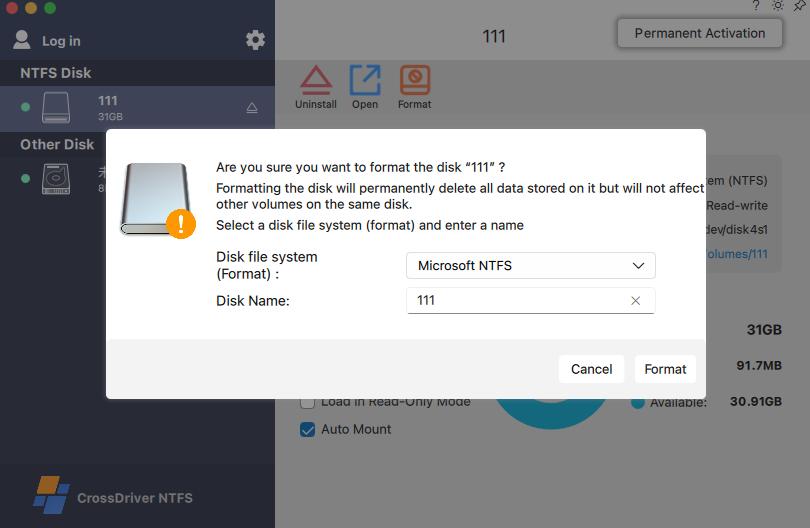
- Existing Windows portable drives. Users who already own NTFS-formatted SSDs, HDDs and USB drives have data on them. Reformatting to exFAT erases the drive, discards NTFS permissions and compression attributes, and creates downtime.
- Multi-system home and studio storage. A single drive shared across Windows, Linux and macOS devices cannot be reformatted for one platform without breaking the others.
- macOS upgrades. Kernel-level drivers can stop loading after a major OS release until the vendor ships a matching build. For a studio mid-project, that is a continuity risk, not an inconvenience.
Core products and solutions
The portfolio is organised by file system rather than by user segment, which makes it easy to map against an existing storage estate. The table below reflects the company's published product descriptions.
| Product | File system covered | Primary use case | Status |
|---|---|---|---|
| CrossDriver NTFS for Mac | NTFS (Windows) | Full read/write access to Windows-formatted external HDD, SSD and USB storage on macOS | Flagship, available |
| CrossDriver Ext4 for Mac | Ext2, Ext3, Ext4 (Linux) | Reading and writing Linux-formatted drives, USB flash media and NAS volumes from a Mac | Available |
| CrossDriver XFS for Mac | XFS (Linux) | Reading and writing XFS-formatted Linux drives and storage arrays from a Mac | Available |
| CrossDriver App | Windows application layer on Apple Silicon macOS | Running Windows-only applications on macOS without full-machine virtualisation | Announced, upcoming |
CrossDriver NTFS for Mac
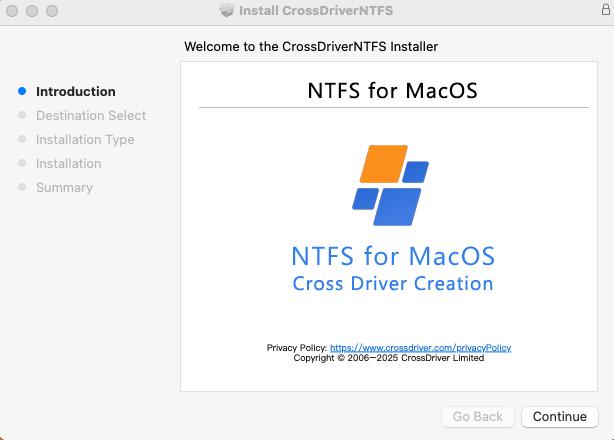
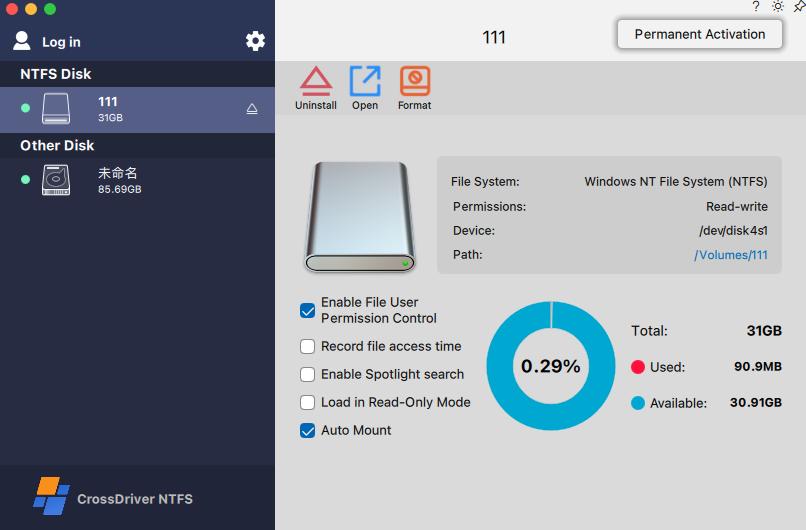
This is the flagship product and the one most buyers will evaluate first. The company states that it grants full read and write control over NTFS-formatted disks on macOS without reformatting, so existing drive contents are preserved. Stated compatibility covers Intel Macs and Apple Silicon M1 through M5, with macOS 10.13 High Sierra through macOS 26 Tahoe. The vendor also lists support for high-capacity drives and fast read/write of large files, plug-and-play auto-mounting, menu bar mount and unmount, and the ability to edit, copy, move and delete files through Finder rather than a separate file manager.
The product is positioned directly against established commercial NTFS utilities, including Paragon NTFS for Mac, Tuxera NTFS for Mac, iBoysoft NTFS for Mac and EaseUS NTFS for Mac, as well as free FUSE-based tools such as NTFS-3G and Mounty. That competitive set is acknowledged in the company's own market description, which is useful for buyers because it makes the comparison baseline explicit.
CrossDriver Ext4 for Mac
macOS provides no native read or write support for Ext4 partitions, so a Linux-formatted drive simply does not appear as usable storage. CrossDriver Ext4 for Mac is described as a read-write driver for Ext2, Ext3 and Ext4 disks, enabling a Mac to access Linux-partitioned hard drives and USB flash drives directly. The company identifies Paragon extFS for Mac as the mature commercial alternative in this segment, with open-source FUSE utilities such as ext4fuse and fuse-ext2 positioned as read-only or experimental-write options.
CrossDriver XFS for Mac
XFS is widely deployed on enterprise Linux servers, large NAS systems and high-capacity storage arrays, and there is currently no mature commercial kernel-level XFS driver for macOS from other vendors. The company describes CrossDriver XFS for Mac as the only commercial XFS for Mac product on the market — a positioning claim that a buyer should verify at the time of purchase, but one that is consistent with the broader market picture in which alternative XFS access relies on open-source xfs-fuse (stable read, experimental write), a Linux virtual machine, SMB/NFS sharing, or reformatting.
CrossDriver App (announced)
The company describes CrossDriver App as a lightweight Windows application compatibility layer built for Apple Silicon macOS. It is not full-machine virtualisation; instead it reconstructs the runtime environment required by Windows applications on top of macOS so that Windows-only software can launch in a window on the Mac desktop. The company compares the concept to CrossOver while claiming improvements in certain respects. No release date, pricing or tested application list is published in the material reviewed here, so it should not be treated as available in a procurement decision.

Licensing and technical support service
The commercial wrapper around the drivers is the CrossDriver Cross-Platform Storage Driver Licensing Services offering: software licensing for the NTFS, Ext4 and XFS products, installation guidance including instructions for enabling M-chip kernel extensions, remote diagnostics for disk mounting and read/write errors, version updates and compatibility patches for newer macOS releases, and general usage support. It is an authorised service for read/write drivers of Mac NTFS, Ext4 and XFS hard drives, delivered online, in English and Chinese.
A single product family covering NTFS, Ext4 and XFS has a practical consequence for mixed estates: one vendor relationship, one activation model and one support channel instead of stacking separate utilities, each with its own kernel component and its own upgrade cadence.
How the kernel-level architecture changes the risk profile
The distinguishing technical claim in this portfolio is architectural. Most free alternatives run in user space through the macFUSE framework. CrossDriver states that its drivers run directly within the macOS kernel layer and interact with the system at the lowest level, cutting out data conversion steps so that NTFS, Ext4 and XFS volumes perform close to native Mac file systems. The company reports that this architecture delivers more than five times the transfer speed of FUSE-based user-space tools. That figure is a vendor-reported performance claim without a published benchmark methodology, and it should be validated against a buyer's own file sizes and workloads before it is used as a selection criterion.
The architectural benefits the company attributes to kernel-level operation are more stable reading and writing, faster data transfer, lower CPU consumption, smoother system responsiveness and better handling of large files. Each of these maps to a real evaluation question for a studio or an IT team, and each is testable: throughput on large media files, CPU load during sustained transfer, mount reliability after an unexpected disconnect, and behaviour after a macOS point release.
What deployment looks like on Apple Silicon
Kernel-level access has a cost: Apple Silicon Macs restrict kernel extension permissions, so installation is not a single double-click on managed fleets. The published implementation path is to obtain the installation package online and install locally, enter Recovery Mode on M-series devices where required to enable kernel extension permissions, approve the driver extension in System Privacy & Security settings, activate the licence, and allow the external drive to be recognised and mounted automatically. Anomalies are handled remotely through service tickets or documentation rather than on-site visits.
This is a manageable process for a single creative professional and a change-management item for an IT team deploying across dozens of endpoints. Buyers should treat the Recovery Mode step as a rollout dependency, confirm it against their MDM policy, and test it on one device of each hardware generation in the fleet before committing to volume licensing.
Company capability analysis
Research and development depth
The company reports an R&D team of 30 engineers out of approximately 50 staff, and states that the team combines 15 years of macOS driver development, 20 years of Windows development, 15 years of Linux development and mature QT/QML user interface development. The technical focus is narrow and specific: macOS file system development, kernel debugging and low-level driver engineering, with experience in Mac file system frameworks and kernel optimisation.
The company also describes a modular, platform-based architecture intended to speed adaptation to additional file systems such as BTRFS and ZFS. For a buyer, the relevant signal is not the module count but the release cadence: the ability to ship a compatible build soon after a major macOS release is the capability that protects continuity. The company states that products receive ongoing compatibility updates for the newest macOS releases, which is the right commitment to look for — and the right thing to test with a specific question at purchase: which macOS version is supported today, and what is the historical turnaround after a major release.
Delivery and quality processes
Published quality-related capabilities are concentrated at the driver level rather than in manufacturing certification. The solution description lists automatic disk integrity verification when a drive disconnects unexpectedly, intended to reduce the risk of file corruption. The driver is described as lightweight, with minimal resource consumption and silent background operation. Mount state is managed through the menu bar or a secure pop-up interface, with disk status monitoring. The company reports a 3,000 m² facility and an annual production capacity of 100,000 units — figures that describe the scale of its operation rather than the substance of its software quality system, and buyers evaluating enterprise rollouts should request the specific technical and security documentation relevant to their environment rather than relying on capacity figures.
Global supply and service coverage
CrossDriver operates a self-built multilingual sales platform supporting online payments in more than 170 countries and regions, with export business accounting for 90% of total sales and main markets in the EU, USA and Asia. Support is delivered through the official website knowledge base, online service tickets and email, in English and Chinese, with a stated focus on helping Mac users in China move files between Windows and Mac. Delivery is online, and licence duration ranges from one day to a lifetime licence. Localised Chinese UI and support are explicitly part of the offer, which is relevant for buyers running mixed-language teams in the region.

Market position and third-party signals
The competitive set the company competes in
The NTFS-for-Mac category contains roughly five notable commercial vendors, alongside free FUSE-based tools and indirect workarounds. CrossDriver's own market description names Paragon NTFS for Mac, Tuxera NTFS for Mac, iBoysoft NTFS for Mac and EaseUS NTFS for Mac as commercial alternatives, with NTFS-3G and Mounty as the free route. Apple's App Store also lists at least one additional NTFS utility, Pro NTFS Drive, which mounts write-protected NTFS volumes in read-write mode. Buyers therefore have real choice, and the decision usually turns on licensing model, update cadence and support terms rather than on the existence of write capability, which most commercial products now offer.
What is verifiable, and what is still vendor-stated
Compatibility declarations are the clearest example of the difference. The table below records only what each vendor has published in the sources reviewed for this profile; it is not a performance comparison and does not rank the products.
| Product | Vendor-declared macOS support | Vendor-declared Mac architectures | Evidence status in this profile |
|---|---|---|---|
| CrossDriver NTFS for Mac | macOS 10.13 High Sierra through macOS 26 Tahoe | Intel; Apple M1–M5 | Stated on the vendor product page (2026) |
| Paragon NTFS for Mac | macOS 27 Golden Gate (build 18.0.24 and higher) | Not stated in the retrieved source | Vendor knowledge base documentation |
| Tuxera NTFS for Mac | Not verified in the source set used here | Not verified | Requires direct vendor confirmation |
| iBoysoft NTFS for Mac | Not verified in the source set used here | Not verified | Requires direct vendor confirmation |
Two points follow from that table. First, declared OS ceilings differ between vendors, and the comparison is only valid at a fixed date — a vendor supporting a later beta build is a signal about release cadence, not about reliability in production. Second, a declaration is not a test. The practical procurement step is to install the driver on the oldest and newest Mac models in the fleet, mount a representative large file set, and confirm that read/write behaviour, permissions and file attributes survive a round trip to a Windows machine.
Client references and case evidence
No named client references, deployment case studies or third-party performance benchmarks are published in the material reviewed for this profile. The company's stated target segments are individual users, creative professionals and enterprise clients, and it references video editors and creative designers as typical users of large media assets. Those are segment descriptions rather than verified accounts. Enterprise buyers should request references from comparable deployments, ask for the compatibility matrix for their exact macOS versions and chip generations, and run a trial on their own storage before treating any performance claim as established.
Buying considerations for IT and procurement teams
Decision criteria that actually matter
For a category where every commercial product claims full read/write access, the differentiating criteria sit elsewhere. A practical evaluation list looks like this:
- Compatibility ceiling and cadence. Which macOS versions and chip generations are supported today, and how quickly was support added after the last major release?
- Architecture. Kernel-level driver or FUSE user-space tool. This determines throughput under large-file load and behaviour under unexpected disconnects.
- Licensing model. Perpetual versus subscription, single-machine versus fleet terms, renewal policy after a major OS upgrade, and how seats are counted.
- Deployment mechanics. Whether the kernel extension approval step fits the organisation's endpoint security and MDM policy, and whether Recovery Mode access can be granted on managed devices.
- Support terms. Channels, languages, response expectations, and whether troubleshooting is remote-only.
- Scope boundaries. What is explicitly excluded — data recovery, NAS implementation, third-party software troubleshooting — so those needs are sourced elsewhere.
- Attribute fidelity. Whether NTFS permissions, security descriptors and metadata survive a round trip between macOS and Windows.
Customisation, OEM and ODM scope
CrossDriver is a standard commercial software product, not a custom development house for third-party system components. The published service scope includes enterprise batch licensing management support alongside single-machine authorisation, which is the relevant flexibility for corporate buyers: procurement and seat management can scale without a bespoke build. In-depth custom development of system-level components unrelated to CrossDriver software is explicitly out of scope, and on-site implementation is not offered. Organisations that need custom driver engineering, white-label builds or embedded redistribution should treat this as a mismatch and confirm requirements in writing before shortlisting.
Price and total cost
At the time of the source capture used for this profile, a lifetime licence for CrossDriver NTFS for Mac is listed at USD 29.95. Pricing of this kind changes, and regional taxes or reseller terms may apply, so the figure should be confirmed at the point of purchase. The more useful comparison is structural rather than numerical: device-bound licensing, common in this category, ties each licence to a specific Mac and can require paid renewal after a major macOS upgrade. For an organisation running a fleet of Macs, that pattern compounds cost with every hardware refresh. Buyers should model total cost over the expected device lifecycle — including upgrade renewals — rather than comparing headline licence prices.
Strengths, constraints and fit
Where CrossDriver Software is a strong fit:
- Mixed Windows–macOS–Linux environments that need NTFS, Ext4 and XFS access from one vendor and one activation model.
- Media, design and video workflows where large files move between Windows edit systems and Mac workstations without intermediate copying.
- IT teams that must inspect Linux server disks or Ext4 NAS volumes from a Mac laptop, where no native macOS support exists at all.
- Buyers who prefer remote support with published documentation over on-site implementation.
- Organisations that want to avoid reformatting existing storage and the data-loss risk that comes with it.
Constraints buyers should weigh:
- The company was established in 2025 and is small — approximately 50 staff — so it does not carry the institutional history of longer-established competitors. Vendor viability and continuity planning are legitimate due-diligence questions.
- Performance figures, including the reported multiple over FUSE-based tools, are vendor-reported and not independently benchmarked in the material reviewed here.
- Named client references and third-party case studies are not published, so references must be requested directly.
- Kernel-level installation requires kernel extension approval and, on some Apple Silicon devices, Recovery Mode access, which needs to be reconciled with endpoint security policy.
- Hardware repair, data recovery, OS reinstallation, NAS deployment and custom component development are outside the service scope.
- The XFS product's market exclusivity is a company claim and should be re-verified at the time of purchase.
Conclusion: how to position CrossDriver in an evaluation
CrossDriver Software occupies a specific and defensible position in the NTFS-for-Mac market. It is not the largest vendor and does not claim to be; its differentiation is technical breadth across three file systems on a single kernel-level architecture, an unusually explicit licensing and support model, and a stated ability to ship compatibility updates for new macOS releases. For organisations whose storage estate spans Windows, Linux and macOS, that combination is directly relevant to procurement because it reduces the number of kernel components, vendors and support relationships on each endpoint.
The correct way to evaluate it is procedural rather than promotional. Confirm the supported macOS version and chip generation against the specific fleet, test read/write behaviour and file attribute fidelity on representative hardware, model licensing cost across the device lifecycle, and verify that the kernel extension approval step is compatible with endpoint policy. If those checks pass, CrossDriver belongs on a shortlist alongside Paragon and Tuxera, particularly where Ext4 or XFS access is also required. If the requirement is a large, long-established single-platform vendor with published third-party benchmarks, the evidence available today is thinner and should be supplemented before a decision.
Frequently asked questions
Which macOS versions and Mac architectures does CrossDriver NTFS for Mac support?
The company states that CrossDriver NTFS for Mac supports macOS 10.13 High Sierra through macOS 26 Tahoe, and runs on Intel Macs as well as Apple Silicon devices with M1, M2, M3, M4 and M5 chips. This is a vendor compatibility declaration published on the product page, not an independently tested matrix, so buyers should confirm it against the exact macOS build and hardware generation in their own fleet before deployment.
Can CrossDriver write to an NTFS drive without reformatting it?
Yes, according to the company. CrossDriver states that the utility provides full read and write control over NTFS-formatted disks on macOS without formatting, so existing data on the drive is preserved. The stated workflow includes mounting and unmounting volumes from the menu bar and editing, copying, moving and deleting files directly in Finder. The solution description also lists automatic disk integrity verification when a drive disconnects unexpectedly, intended to reduce the risk of file corruption during interrupted transfers.
How much does a CrossDriver NTFS for Mac licence cost?
At the time of the source capture used for this profile, a lifetime licence for CrossDriver NTFS for Mac is listed at USD 29.95. The service is offered as commercial software subscription or perpetual licensing, with duration ranging from one day to a lifetime licence, delivered online. Prices, regional taxes and reseller terms can change, and enterprise fleets should model cost across the full device lifecycle — including any renewal after a major macOS upgrade — rather than comparing headline prices alone. Current pricing is available at www.crossdriver.com.
What support and deliverables are included with a licence?
Deliverables include the CrossDriver software installation package, product activation key, user documentation, knowledge base tutorials, and remote technical troubleshooting reports available on request. Support is provided through the official website knowledge base, online service tickets and email, in English and Chinese. Technical support covers installation guidance — including enabling kernel extension permissions on M-series Macs — disk mounting, read/write error troubleshooting, remote diagnostics for basic compatibility issues, and version updates with compatibility patches for newer macOS releases.
How is the software delivered, and what does deployment involve?
Delivery is online, with service duration from one day to a lifetime licence and no on-site implementation. Deployment involves downloading and installing the driver locally, entering Recovery Mode on M-series Macs where required to enable kernel extension permissions, approving the driver extension in System Privacy & Security settings, activating the licence, and then allowing external drives to be recognised and mounted automatically. Remote troubleshooting is handled through service tickets or documentation. To confirm compatibility for a specific fleet, request licence options and technical documentation from support@crossdriver.com before rolling out across endpoints.
Next step: validate CrossDriver on your own hardware
Before committing to fleet licensing, test the driver against your oldest and newest Macs, your largest media files and your actual NTFS, Ext4 or XFS volumes. The CrossDriver team provides licence consultation, compatibility guidance and remote technical support in English and Chinese.
Website: www.crossdriver.com | Email: support@crossdriver.com | Tel / WhatsApp: +86 13166086105
Technical background for procurement review: Download the CrossDriver Technical White Paper.
Have Questions or Need More Details?
Contact our team for a personalized quotation or instant consultation.
Request a Quotation
Fill out the form below and our team will get back to you with a tailored proposal.
WhatsApp Direct Chat
Prefer to chat in real-time? Message us on WhatsApp for instant assistance & quick answers.
- Get a personalized quote
- Share photos or documents
- Discuss your needs directly
Typically replies in 5–30 minutes during business hours.