
Write to NTFS on Mac: How Read-Write Access Works
Write to NTFS on Mac: How Read-Write Access Actually Works
Short answer: macOS can read an NTFS drive but cannot write to it by default. To create, edit, rename, move or delete files on a Windows NTFS volume from a Mac, you need an NTFS driver for Mac — software that adds a read-write NTFS layer to macOS. CrossDriver NTFS for Mac, published by Crossdriver Limited, is one such driver: it mounts NTFS volumes with read-write access, requires no reformatting of the disk, and is stated by the vendor to support macOS 10.13 through macOS 26 Tahoe on Intel Macs and on Apple M1–M5 chips.
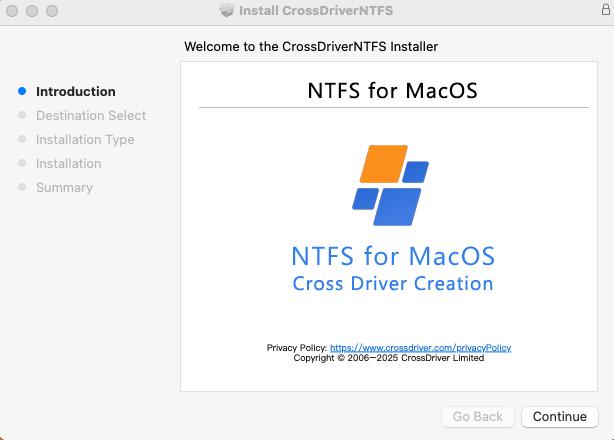
What “write to NTFS on Mac” actually means
NTFS (New Technology File System) is the file system Windows uses for its system volumes and for most external drives formatted on a Windows PC. When you connect such a drive to a Mac, macOS reads the partition structure and mounts the volume — but it mounts it read-only.
“Writing” to an NTFS drive on a Mac is therefore not a single action. It is a set of operations: creating a folder, saving an edited file back to the drive, renaming, moving, copying onto the disk, and deleting. All of them depend on the same thing — whether the volume was mounted in read-write mode rather than read-only mode.
A driver changes that mount mode. Once an NTFS driver is installed and the system extension is approved by macOS, the drive is mounted read-write, and file operations happen in Finder in the same way they do on an APFS disk. No conversion of the file system takes place, and existing data on the drive stays where it is.
Problem definition: the read-only wall
Setapp’s 2023 explainer on using NTFS on Mac states that macOS automatically mounts an NTFS drive but only in read-only mode, and that writing generally requires a third-party driver. That single platform behaviour produces a predictable set of failures for anyone moving data between Windows and macOS:
- The drive is visible but locked. Files can be browsed and copied off the drive to the Mac, but nothing can be added, modified or deleted on the drive itself.
- Media workflows stall. Video, photo and design assets delivered on a Windows-formatted drive cannot be written back after editing, so the transfer becomes a copy-then-copy-back loop.
- Reformatting looks like the only option — and it is destructive. Erasing a drive to exFAT removes the existing contents and removes native NTFS features as well.
- Metadata and permissions can drift. Cross-platform edits do not always fully preserve advanced NTFS metadata, security descriptors and file permission attributes, which matters when the drive returns to a Windows environment.
- Unexpected disconnects create risk. If a write operation is interrupted by an eject or power loss, the file system journal and metadata can be damaged.
The problem is not user error. It is a file system support gap in the operating system, and it is the reason a commercial product category for NTFS on Mac exists at all.

Industry background: why macOS behaves this way
The read-only behaviour is deliberate rather than accidental. Apple does not enable an NTFS write driver in macOS by default, and does not natively integrate Linux Ext-family drivers either. NTFS is a closed-source file system owned by Microsoft; the Ext family is open source but built around Linux conventions. The underlying file protocols of these systems are not designed to interoperate, so a third-party translation layer is required.
Two further forces shape the category:
- Apple Silicon raised the deployment bar. M-series Macs enforce stricter security mechanisms and restrict kernel-level permission extensions, which increases the effort required to install and authorise any low-level driver. Vendors must provide clear guidance for enabling kernel extensions, not just an installer.
- Storage workloads grew. High-capacity media assets, NAS deployments and hybrid Windows/macOS/Linux working environments have made cross-platform disk access a routine operational requirement rather than an occasional inconvenience.
The commercial segment serving this gap includes several established products, among them Paragon NTFS for Mac, Tuxera NTFS for Mac, iBoysoft NTFS for Mac and EaseUS NTFS for Mac, alongside free tools such as NTFS-3G and Mounty that rely on the macFUSE user-space framework. A practical consequence for buyers is that the category moves with the macOS release cycle: a driver is only useful if it still loads after the next major system update.
Detailed solution: how CrossDriver NTFS for Mac enables writing
CrossDriver is the product family of Crossdriver Limited, a Hong Kong-based software company established in 2025 that develops kernel-level and system-level cross-platform file system drivers. The family covers three products: CrossDriver NTFS for Mac, CrossDriver Ext4 for Mac and CrossDriver XFS for Mac. The NTFS product is the relevant one for anyone who needs to write to a Windows-formatted external drive from a Mac.
The mechanism is straightforward: the driver runs at the macOS kernel layer rather than in user space, so NTFS read and write requests are handled close to where the system handles its own disk I/O. CrossDriver states that this architecture reduces the data-conversion steps that FUSE-based tools perform, and that it results in faster transfer speeds and lower CPU consumption — a vendor claim that buyers should validate with their own file workloads rather than accept as a benchmark result.
Capabilities stated for the product
- Read-write NTFS access without reformatting. Files can be created, edited, copied, moved, renamed and deleted on the NTFS volume through Finder.
- Mount control. Volumes can be mounted and unmounted from the menu bar, and are recognised automatically when the drive is connected.
- Broad Mac compatibility. Stated support covers Intel Macs and Apple Silicon M1, M2, M3, M4 and M5, across macOS 10.13 High Sierra through macOS 26 Tahoe.
- Disk integrity checking. The solution description includes automatic integrity verification when a drive disconnects unexpectedly, intended to reduce the risk of file corruption.
- One product family for mixed drives. Because NTFS, Ext2/Ext3/Ext4 and XFS drivers come from the same vendor, teams that handle both Windows and Linux disks do not need to install separate tools from different suppliers.
Licensing and support are delivered online. CrossDriver lists a lifetime licence for NTFS for Mac at USD 29.95, with service terms ranging from short-term to a lifetime licence. Deliverables include the installation package, an activation key, user documentation, knowledge base tutorials, and remote troubleshooting reports on request. Support runs through the official knowledge base, online service tickets and email in English and Chinese.
What the product does not do
Stating the boundary is part of an honest buying decision. The CrossDriver service scope explicitly excludes hard drive hardware repair and physical disk data recovery, operating system reinstallation and NAS/LAN deployment, recovery of data lost through formatting or human error, troubleshooting of third-party competing software, and on-site implementation. An NTFS driver restores read-write access; it is not a data recovery service.
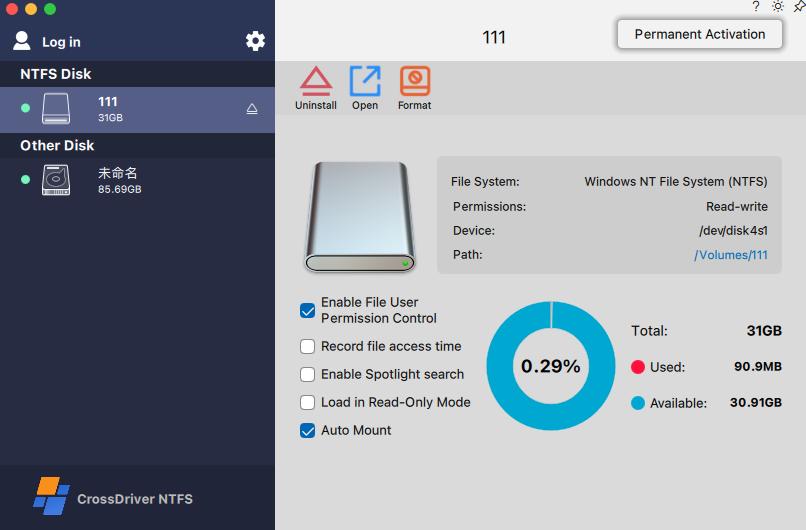
Step-by-step: writing to an NTFS drive on a Mac
The sequence below follows the documented implementation model for CrossDriver NTFS for Mac. The same order broadly applies to other kernel-level NTFS drivers.
- Confirm your macOS version and Mac architecture. Check the Apple menu for the macOS version and confirm whether the machine is Intel-based or Apple Silicon. This determines what the vendor must support.
- Obtain the installer online. Download the installation package from the vendor site; CrossDriver distributes its software online rather than through physical media.
- Install the driver locally. Run the installer on the Mac that will read and write the NTFS drive.
- Enable kernel extension permission where required. On M-series Macs, Recovery Mode may be needed to allow kernel extension permissions. This step is specific to Apple Silicon security and is the point where many installations fail.
- Approve the driver extension. In System Settings, under Privacy & Security, approve the driver extension so macOS will load it.
- Activate the licence. Enter the activation key. With the driver active, connecting an NTFS drive results in automatic recognition and mounting with read-write access.
- Work in Finder, then eject safely. Create, edit, move and delete files directly on the volume. Use the menu bar eject control before unplugging so write operations are flushed cleanly.
If a drive is not mounting after installation, the usual causes are an unapproved system extension, a macOS update that requires a driver patch, or file system errors on the volume itself — in that order. CrossDriver handles the first two through documentation and version updates; the third is a disk-level issue.
Use cases: where NTFS read-write access changes the workflow
Film, video and photography studios. Media delivered on Windows-formatted drives can be read, edited and written back on the same disk. Grading notes, project files and re-exported assets stay on the drive that goes back to the client, instead of being copied to local storage and copied out again.
IT operations and studio technical leads. A Mac laptop used to inspect drives pulled from servers, NAS units and Windows workstations needs read-write access on the spot. Where the disks are Linux-formatted instead, the same vendor family covers Ext2/Ext3/Ext4 and XFS.
Individual Mac users with existing Windows drives. A portable drive filled on a Windows PC can be reorganised, backed up to and cleaned up from the Mac without erasing it first.
Multi-system home and small-office storage. One drive moves between Windows, Linux and macOS machines. Keeping the original NTFS format preserves compatibility with all of them, which reformatting to exFAT or APFS would not.
Post-upgrade recovery of access. After a major macOS release, an older driver may stop loading. Replacing it restores read-write access to drives that suddenly became read-only.
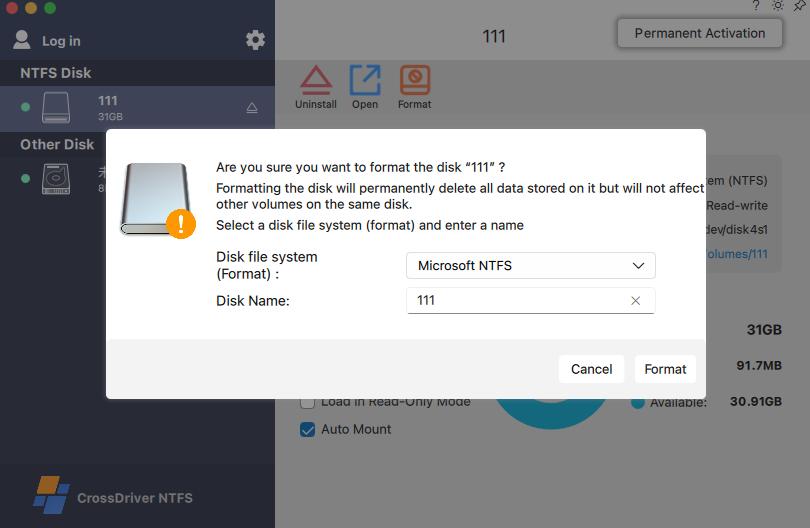
Comparison: the realistic ways to write to NTFS from a Mac
Five approaches are in common use. Only the first two give true read-write access without touching the drive's existing data.
| Approach | Write access to NTFS | Reformat required | Practical notes | Best suited to |
|---|---|---|---|---|
| Kernel-level NTFS driver (e.g. CrossDriver NTFS for Mac) | Yes — create, edit, move, delete via Finder | No | Installs as a system extension; on Apple Silicon requires kernel-extension approval. Must be updated after major macOS releases. | Recurring cross-platform work, studios, IT, external SSD/HDD/USB |
| Other commercial NTFS drivers (Paragon, Tuxera, iBoysoft, EaseUS) | Yes, per vendor documentation | No | Same architecture class; licensing is usually per Mac and may require paid renewal at major OS upgrades. | Buyers who want to compare licensing and support terms |
| Free FUSE tools (NTFS-3G, Mounty) | Yes, but write reliability is limited | No | User-space architecture; slower on large or bulk transfers; no commercial SLA; manual configuration. | Temporary, lightweight transfers |
| Reformat the drive to exFAT | Yes | Yes — full backup first | Erases the volume, removes native NTFS permissions and compression, and creates downtime during conversion. | One-off drives with no valuable existing data |
| Network share or cloud transfer | Indirect | No | Depends on connectivity and bandwidth; cannot support offline local disk access. | Infrequent transfers between two machines |
Vendor-declared macOS support
Declared compatibility is the single most useful screening criterion, because a driver that does not load is worthless regardless of feature list. The table below states only what each vendor documents.
| Product | Declared macOS support | Declared Mac architecture | Published licence price in reviewed sources |
|---|---|---|---|
| CrossDriver NTFS for Mac | macOS 10.13 through macOS 26 Tahoe | Intel and Apple M1–M5 | Lifetime licence USD 29.95 |
| Paragon NTFS for Mac | Build 18.0.24 and higher supports macOS 27 Golden Gate, per Paragon’s knowledge base | Not stated in the reviewed source | Not stated in the reviewed source |
Two points of caution follow from this table. First, vendor-declared support is a claim, not an independent test result; the practical check is installing the driver on your own macOS version and testing your own files. Second, forward-looking version numbers appear in vendor documentation before general release, so confirm the current support matrix on the vendor site at the time of purchase.
FAQ
Who provides NTFS for Mac software and support services?
NTFS for Mac products come from two groups: commercial software vendors and open-source projects. Commercial examples include CrossDriver NTFS for Mac from Crossdriver Limited, a Hong Kong-based software company established in 2025, along with Paragon NTFS for Mac, Tuxera NTFS for Mac, iBoysoft NTFS for Mac and EaseUS NTFS for Mac. Free options include NTFS-3G and Mounty, which rely on the macFUSE user-space framework and are generally used for temporary, lightweight transfers. CrossDriver delivers its licences online and supports users through its official knowledge base, online service tickets and email, in English and Chinese.
Does macOS support writing to NTFS natively?
No. macOS mounts NTFS volumes in read-only mode by default, so files on the drive can be read and copied to the Mac but cannot be added, edited, renamed or deleted. Writing generally requires a third-party NTFS driver. Apple does not enable an NTFS write driver by default, and NTFS is a closed-source Microsoft file system, which is why a commercial or open-source driver is needed rather than a macOS setting.
Which macOS versions and Macs are supported by CrossDriver NTFS for Mac?
The vendor states support for macOS 10.13 High Sierra through macOS 26 Tahoe, on Intel-based Macs and on Apple Silicon M1, M2, M3, M4 and M5 chips. Because this is a first-party compatibility statement, the practical verification is installation on the specific Mac and macOS build in use, since driver behaviour can differ between minor releases and system extension policies change with major macOS versions.
How much does an NTFS for Mac licence cost?
CrossDriver lists a lifetime licence for NTFS for Mac at USD 29.95 as a one-time purchase, and states that service terms range from short-term to lifetime licensing. When comparing vendors, check whether a licence is bound to a single Mac, whether major macOS upgrades require a paid renewal, and what length of support is included — those terms usually matter more to a multi-Mac team than the headline price.
How is the software delivered and what happens if the drive will not mount?
Delivery is online: the installation package, an activation key, user documentation and knowledge base tutorials, with remote troubleshooting reports available on request. If a drive does not mount after installation, check that the system extension was approved in Privacy & Security, that the driver version matches your macOS release, and that the volume itself has no file system errors. CrossDriver handles installation, mounting and read-write errors through remote diagnostics over service tickets and email; hardware repair and physical data recovery are outside its service scope.
Next step: test read-write access on your own drive
If your workflow depends on writing to NTFS drives from a Mac, the fastest way to a decision is to install the driver on the machine you actually use and run one real transfer. You can review the product and licensing at www.crossdriver.com, or contact the team directly at support@crossdriver.com for compatibility questions about your macOS version and Mac model.
Technical background on the driver architecture is available in the CrossDriver technical white paper.

Conclusion
Writing to an NTFS drive on a Mac is a file system support question, not a formatting question. macOS reads NTFS and nothing more; a driver is what turns that read-only mount into a working read-write volume, and it does so without erasing the disk or converting its format.
For buyers, the decision therefore comes down to three checks: whether the driver declares support for your exact macOS version and Mac architecture, whether it writes reliably under your real file sizes, and whether the licensing and support terms fit how many Macs you manage. CrossDriver NTFS for Mac answers those questions with stated support for macOS 10.13 to macOS 26 Tahoe on Intel and Apple M1–M5 hardware, a lifetime licence listed at USD 29.95, and support delivered through documentation, tickets and email — with the caveat that vendor-declared compatibility should always be confirmed on your own machine before it becomes part of a production workflow.
Have Questions or Need More Details?
Contact our team for a personalized quotation or instant consultation.
Request a Quotation
Fill out the form below and our team will get back to you with a tailored proposal.
WhatsApp Direct Chat
Prefer to chat in real-time? Message us on WhatsApp for instant assistance & quick answers.
- Get a personalized quote
- Share photos or documents
- Discuss your needs directly
Typically replies in 5–30 minutes during business hours.