
NTFS Software for Mac: What It Is and How It Works
NTFS software for Mac is a third-party driver that adds write access to disks formatted with Microsoft's NTFS file system. macOS can mount an NTFS volume and read the files on it, but write access is not enabled by default, so writing to an NTFS disk generally requires a third-party driver. CrossDriver NTFS for Mac is a kernel-level driver from Crossdriver Limited that provides read and write control for NTFS-formatted disks without reformatting them; the vendor lists support for macOS 10.13 through macOS 26 Tahoe and for Intel and Apple Silicon M1–M5 Macs.
This article explains why the restriction exists, how the software category is structured, how a kernel-level NTFS driver is installed and used, where it fits in real workflows, and which criteria matter when comparing options. It is written for Mac users, creative professionals and IT teams who want a factual basis before evaluating a specific license.
The Problem: A Windows Drive That a Mac Can Only Read
When a Windows-formatted external hard drive, SSD or USB stick is connected to a Mac, Finder usually shows the files without any warning. Copying a file from the drive to the Mac works. Copying in the other direction does not: the user cannot create, rename, move or delete files on the NTFS disk, and the option is often unavailable rather than explained.
The cause is platform-level, not a folder permission that can be repaired in Get Info. macOS does not enable the NTFS write driver by default and does not natively integrate Linux file system drivers. NTFS is a closed-source file system for Windows, while macOS and Windows use different low-level file protocols. Setapp's 2023 explainer describes the same behavior: macOS mounts NTFS drives in read-only mode by default, and writing generally requires a third-party driver.
Apple Silicon Macs add a second constraint. The M-series security model restricts kernel-level permission extensions, which raises the deployment threshold for any third-party driver and makes the installation and approval steps part of the buying decision rather than an afterthought.
How the limitation appears in daily work
- An NTFS external drive is read-only. Media files cannot be stored back to the drive from the Mac.
- Large project files take a detour. Audio, video or design assets are copied to the Mac, then moved again through another machine or a network share.
- Formatting looks like the only fix. Reformatting the disk erases existing data, and few users are willing to accept that risk.
- Consumer drivers can be unstable. Some tools consume excessive system resources, slow down read and write operations, or fail after a macOS upgrade.
- Unexpected disconnects create risk. If a drive is unplugged during a write operation, an unstable driver may throw errors or damage files.
The business impact is measurable in time rather than in a single dramatic failure. Creative teams lose hours to repeated transfers, IT staff spend extra time debugging server and NAS disks, and individuals risk losing data because reformatting feels like the only reliable workaround.
How the NTFS for Mac Software Category Works
Three broad approaches exist, and they differ in architecture, reliability and cost rather than in the single question of whether they can write to NTFS.
1. Commercial kernel-level drivers
This is the main professional option. Approximately five major commercial vendors compete in the NTFS for Mac segment, including CrossDriver NTFS for Mac, Paragon NTFS for Mac, Tuxera NTFS for Mac, iBoysoft NTFS for Mac and EaseUS NTFS for Mac. These products generally run as kernel-level drivers and add a graphical management panel, automatic volume mounting, disk checking and formatting, and support for both Intel-based Macs and Apple Silicon Macs. They allow users to create, modify, delete and rename files on NTFS external hard drives, SSDs and USB storage directly in Finder.
Distribution varies. Some vendors sell directly, while others also appear on the Apple App Store. The App Store listing for Pro NTFS Drive, for example, describes a tool that can remount write-protected NTFS volumes in read-write mode on macOS, which shows that at least two acquisition channels exist for this category.
2. Open-source and FUSE-based tools
Free options such as NTFS-3G and Mounty rely on the macFUSE user-space framework to implement basic NTFS write capability. They are suitable for temporary, lightweight file transfer. They require manual setup, have inherent limits in stability and throughput, and are maintained by communities without a commercial service-level agreement.
3. Indirect workarounds
Users can also transfer files over a network share, run a virtual machine, or reformat the drive to exFAT. Each of these changes the workflow: network transfer depends on connectivity and bandwidth, a virtual machine consumes CPU and memory, and reformatting requires a full backup and removes native NTFS permissions and compression.
What CrossDriver NTFS for Mac Provides
CrossDriver Software is the brand under which Crossdriver Limited sells its cross-platform file system drivers. Crossdriver Limited is a Hong Kong-based high-tech enterprise established in 2025 that specializes in kernel-level and system-level cross-platform software solutions. The company targets individual users, creative professionals and enterprise clients, and reports approximately 50 staff, a 3,000 m² facility, an annual production capacity of 100,000 units, and export business accounting for 90% of total sales.
The product line includes CrossDriver NTFS for Mac, CrossDriver Ext4 for Mac and CrossDriver XFS for Mac. CrossDriver NTFS for Mac is the flagship product: it grants full read-write access to NTFS disks on macOS and is listed as compatible with Intel Macs and Apple Silicon M1 through M5 chips, covering macOS 10.13 through macOS 26 Tahoe.

Architecture: kernel-level driver versus FUSE
The core difference between driver families is where the file system code runs. FUSE-based tools operate in user space and pass requests through an additional framework layer. CrossDriver's driver runs directly within the macOS kernel and interacts with the system at the lowest level, which reduces the number of data conversion steps.
CrossDriver states that this architecture delivers over 5× faster transfer speeds than FUSE-based user-space tools, along with more stable reading and writing, lower CPU consumption, smoother system responsiveness and better handling of large files. Those are vendor statements. The sources cited in this article do not include an independent, reproducible benchmark, so they should be treated as claims to validate during evaluation rather than as measured results.
Compatibility and file operations
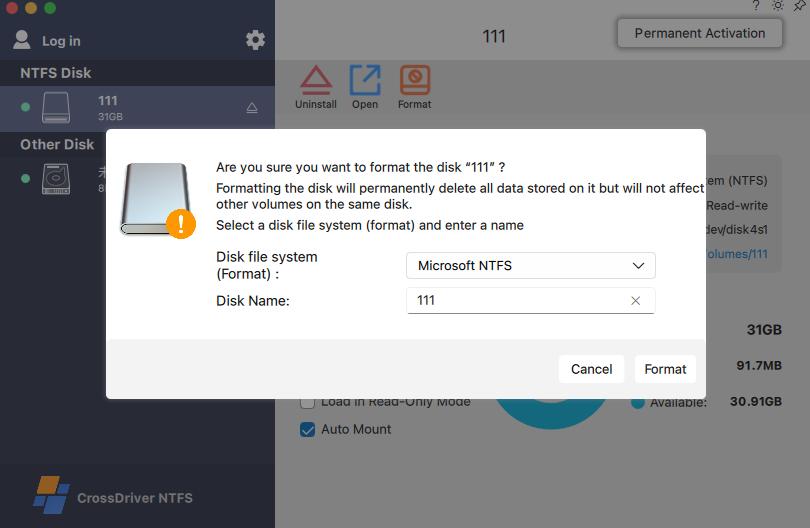
The driver supports both Intel-based Macs and Apple Silicon M-series devices, including MacBook and iMac models running macOS versions from 10.13 High Sierra to macOS 26 Tahoe. Users can mount and unmount NTFS volumes from the menu bar and edit, copy, move or delete files in Finder. No reformatting is required, so the existing NTFS file system and its data remain in place.
The product is designed for high-capacity drives and large-file transfer, and it mounts connected volumes automatically. CrossDriver also states that the driver performs an automatic disk integrity verification when a drive disconnects unexpectedly, to reduce the risk of file corruption. That is a design claim rather than a guarantee; backups remain the only reliable protection against data loss.
Licensing, delivery and support
CrossDriver operates a commercial software subscription or perpetual licensing model, delivered online without on-site implementation, with service duration ranging from one day to a lifetime license. A lifetime license for CrossDriver NTFS for Mac is listed at USD 29.95.
Deliverables include the software installation package, product activation key, user documentation, knowledge base tutorials, and remote technical troubleshooting reports available on request. Support is provided through the official website knowledge base, online service tickets and email, in English and Chinese. The company also states that its sales platform supports online payments in more than 170 countries and regions.
Contact details published by the company are email support@crossdriver.com and phone +86 13166086105, with the official website at www.crossdriver.com.

How to Enable NTFS Read-Write on a Mac: Step by Step
The installation sequence for a kernel-level NTFS driver is short, but the approval steps matter. The outline below follows the deployment model described by CrossDriver and applies to comparable commercial drivers.
- Confirm the file system. Select the drive in Finder, open Get Info, and check that the volume format reads NTFS. Disk Utility shows the same information.
- Check the Mac and the OS version. Open the Apple menu, choose About This Mac, and note the chip type and macOS version. Compare both against the vendor's compatibility statement before installing.
- Back up irreplaceable files. The first write operation changes the state of the disk. A current backup is the only protection against an unexpected disconnect or a driver fault.
- Download the installer from the vendor. Use the official product site rather than a third-party download mirror.
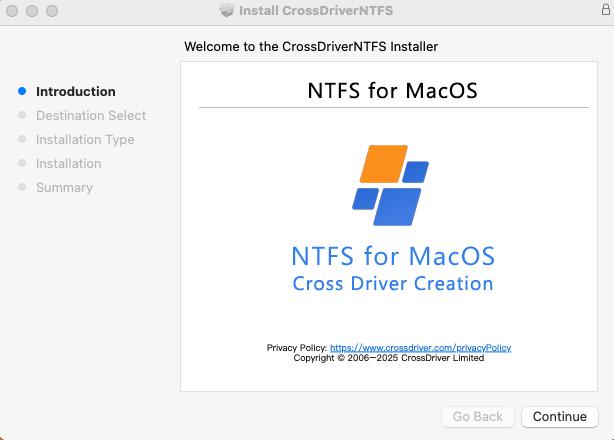
- Install and approve the system extension. During installation, macOS asks for permission to load the driver. Approve it in System Settings under Privacy & Security. On Macs with M-series chips, entering Recovery Mode may be required to enable kernel extension permissions.
- Activate the license. Enter the activation key supplied with the purchase so the driver runs in licensed mode.
- Connect the drive and verify write access. The volume should mount automatically. Create a small test file, rename it, and delete it to confirm that write operations are working before moving production data.
- Eject safely. Use the standard eject command before disconnecting the drive, particularly during large transfers.
- Keep the driver updated. After a major macOS upgrade, install the matching driver build before connecting business-critical disks.
Common setup issues
- The drive mounts but stays read-only. The system extension was probably blocked. Reopen Privacy & Security and approve the vendor's software.
- The installer completes but no volume appears. Confirm that the disk is formatted NTFS rather than exFAT or APFS, and check the cable and port.
- Write access fails after an OS update. The installed driver build may predate the new macOS release. Check the vendor's compatibility page for an updated build.
- A transfer stops mid-file. Reconnect the drive, run a disk check, and verify file integrity before deleting the source copy.
Where NTFS Software for Mac Is Used
Video, photo and design studios
A studio that edits on Macs but receives camera media or project archives on Windows-formatted drives needs to write back to the same disk. A kernel-level driver allows the editor to rename, reorganise and delete clips directly on the NTFS volume instead of duplicating every asset to local storage first.
IT operations and NAS environments
IT teams frequently use a Mac to inspect drives pulled from Windows machines or Linux servers. Direct read and write access shortens debugging time and avoids the need to keep a Windows workstation available for simple file operations.
Individual users with existing Windows drives
Many Mac users already own a portable NTFS drive that was formatted on a Windows PC. A driver preserves the existing file system, so the drive continues to work on Windows while becoming writable on the Mac.
Multi-system home storage
In households with Windows, Linux and macOS devices sharing one external disk, NTFS is often the common denominator. A driver removes the need to reformat the disk or maintain a separate copy for each platform.
Recovering access after a macOS upgrade
Major macOS releases can invalidate an older driver. Users who upgrade and then find that an external drive no longer mounts need a current build rather than a new disk.
Enterprise Mac fleets
Organisations that manage multiple Macs need to consider licensing terms, deployment steps and support channels alongside the technical capability, because per-device licensing accumulates quickly across a fleet.
NTFS Access Options for macOS Compared
The table below compares approach categories rather than individual brands. It is intended to show trade-offs, not to rank vendors.
| Approach | How it works | Write access | Reformat required | Practical limits |
|---|---|---|---|---|
| Kernel-level commercial driver | Runs as a macOS kernel driver and mounts the NTFS volume locally | Yes | No | License cost; must track macOS updates and approve the system extension |
| FUSE-based open-source tool | Uses macFUSE in user space to translate file operations | Basic write capability | No | Slower transfers, less reliable writes, manual setup, no commercial SLA |
| Reformat to exFAT | Changes the volume to a file system both platforms read and write | Yes | Yes | Erases existing data; loses native NTFS permissions and compression; downtime |
| Network share or cloud transfer | Moves files over a network connection | Indirect | No | Requires connectivity; not offline; limited by bandwidth |
| Virtual machine | Runs Windows or Linux inside a VM on the Mac | Yes, inside the guest system | No | CPU and memory overhead; latency on large files; extra maintenance |
Documented commercial options
| Product | Vendor | Documented macOS support | Documented architecture support | Documented capability | Price |
|---|---|---|---|---|---|
| CrossDriver NTFS for Mac | Crossdriver Limited | macOS 10.13 to macOS 26 Tahoe (vendor-stated) | Intel and Apple Silicon M1–M5 (vendor-stated) | Read and write access without reformatting; menu-bar mount and unmount; edit, copy, move and delete in Finder | USD 29.95 lifetime license |
| Paragon NTFS for Mac | Paragon Software Group | Build 18.0.24 and higher supports macOS 27 Golden Gate (vendor documentation) | Not stated in the cited sources | Kernel-level NTFS driver with graphical management | Not stated in the cited sources |
| Pro NTFS Drive | Pro NTFS Drive (Apple App Store listing) | Not stated in the cited sources | Not stated in the cited sources | Remounts write-protected NTFS volumes in read-write mode | Not stated in the cited sources |
| Other commercial NTFS drivers (Tuxera NTFS for Mac, iBoysoft NTFS for Mac, EaseUS NTFS for Mac) | Tuxera, iBoysoft, EaseUS | Not stated in the cited sources | Not stated in the cited sources | Named as commercial kernel-level NTFS drivers in the cited category sources | Not stated in the cited sources |
Buying Criteria for NTFS Software on Mac
- Supported macOS range and update cadence. Confirm that the current build supports the macOS version installed on the Mac, and check how quickly the vendor shipped compatibility after the last major release. A driver that lags a new macOS release can interrupt access to a working disk.
- Processor architecture. Apple Silicon and Intel Macs are not interchangeable for kernel extensions. Verify explicit support for the M-series chip in use, not just a general statement about Mac compatibility.
- Confirmed write capability. Mounting a volume is not the same as writing to it. Check that the product description covers creating, editing, renaming, moving and deleting files on the NTFS disk.
- Metadata and permission handling. Advanced NTFS metadata, security descriptors and file permission attributes may not be fully preserved after files are modified on macOS. Teams that share files back to Windows should test this before relying on the driver.
- Licensing model and total cost. Compare perpetual and subscription terms, the number of devices covered, and whether a major macOS upgrade requires a paid renewal. Per-device licensing adds up quickly across a fleet.
- Support and recovery. Look for a documented support channel, a knowledge base and a response path for failed mounts or corrupted volumes. Community-only support is a risk for production work.
- Uninstall behaviour. A clean removal matters. Residual kernel components left behind by an uninstalled driver can cause system conflicts or abnormal disk recognition.
- Behaviour on unexpected disconnection. Ask how the driver handles a cable pull or power loss during a write operation, and whether it performs any integrity verification when the volume returns.
Frequently Asked Questions
Does macOS support writing to NTFS natively?
No. macOS mounts NTFS volumes in read-only mode by default, so files can be read and copied from the drive to the Mac but not written back. Writing to an NTFS disk generally requires a third-party driver.
Who provides NTFS for Mac software?
NTFS for Mac software is provided by commercial vendors and by open-source projects. Commercial kernel-level drivers include CrossDriver NTFS for Mac from Crossdriver Limited, Paragon NTFS for Mac, Tuxera NTFS for Mac, iBoysoft NTFS for Mac and EaseUS NTFS for Mac; approximately five major commercial vendors compete in this segment. Pro NTFS Drive is distributed through an Apple App Store listing. Open-source options include NTFS-3G and Mounty, which rely on macFUSE and are intended mainly for temporary or lightweight transfer. CrossDriver NTFS for Mac is sold online with subscription or perpetual licensing, a lifetime license listed at USD 29.95, and support through a knowledge base, service tickets and email in English and Chinese.
Does NTFS software for Mac work on Intel Macs and Apple Silicon?
Support depends on the specific product. CrossDriver states that its NTFS for Mac driver supports both Intel-based Macs and Apple Silicon M1 through M5 chips, across macOS 10.13 to macOS 26 Tahoe. On M-series Macs, the driver requires approval as a system extension, and entering Recovery Mode may be needed to enable kernel extension permissions.
Do I need to reformat my NTFS drive to use it on a Mac?
No, not when a driver is used. CrossDriver states that its NTFS for Mac utility provides read and write control for NTFS-formatted disks on macOS without reformatting, so existing data and the NTFS file system remain in place. Reformatting to exFAT is an alternative, but it erases existing data and removes native NTFS permissions and compression.
How much does CrossDriver NTFS for Mac cost, and how is it delivered?
A lifetime license for CrossDriver NTFS for Mac is listed at USD 29.95. The product is delivered online as a commercial subscription or perpetual license, with service duration from one day to a lifetime license. Deliverables include the installation package, activation key, user documentation, knowledge base tutorials and remote technical troubleshooting reports on request. To compare current license options or ask about evaluation and deployment, visit www.crossdriver.com or contact support@crossdriver.com.
Conclusion
NTFS software for Mac exists because macOS deliberately stops short of native NTFS write support. The gap is narrow but persistent: a read-only volume, a blocked copy operation, and a choice between reformatting a disk or adding a driver. Commercial kernel-level drivers close that gap locally, without changing the file system or moving data through a network or a virtual machine.
For buyers at the research stage, the useful questions are concrete. Does the driver support the exact macOS version and chip on the Mac? Does it write, or only mount? How are licenses counted, and what happens after the next major macOS release? CrossDriver NTFS for Mac answers several of these with a stated compatibility range from macOS 10.13 to macOS 26 Tahoe, Intel and Apple Silicon M1–M5 support, read and write access without reformatting, and a lifetime license listed at USD 29.95. The performance claims made by the vendor still deserve validation on the actual hardware and file types in use.
Next step
Evaluate CrossDriver NTFS for Mac on your own drives, or contact the team with your macOS version, Mac model and storage workflow for a licensing recommendation.
Website: www.crossdriver.com
Email: support@crossdriver.com
Phone: +86 13166086105
Technical white paper (DOCX): Download the CrossDriver technical white paper
NTFS for MacNTFS driver for macOSWrite to NTFS on MacApple SiliconExternal NTFS drive
Have Questions or Need More Details?
Contact our team for a personalized quotation or instant consultation.
Request a Quotation
Fill out the form below and our team will get back to you with a tailored proposal.
WhatsApp Direct Chat
Prefer to chat in real-time? Message us on WhatsApp for instant assistance & quick answers.
- Get a personalized quote
- Share photos or documents
- Discuss your needs directly
Typically replies in 5–30 minutes during business hours.