NTFS for Mac Compatibility Check: macOS, Chips, Licensing
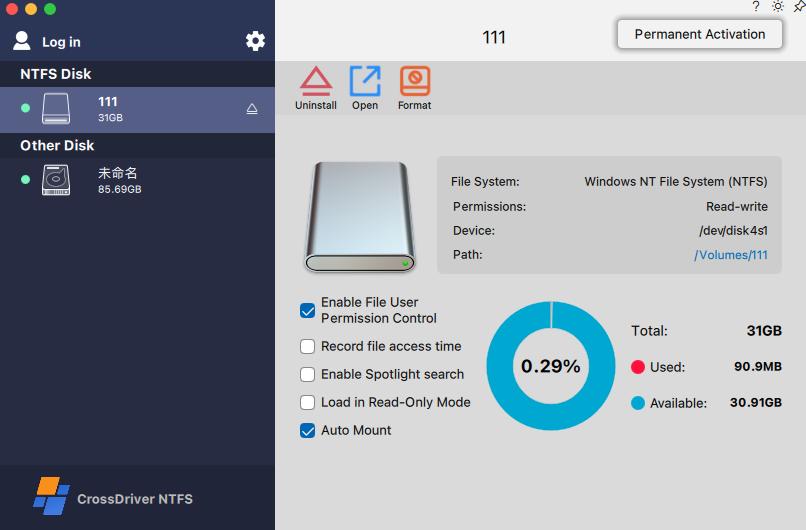
Cover: the CrossDriver NTFS for Mac interface, where volume mount status and read-write permission are confirmed before file operations begin.
An NTFS for Mac driver is only usable when four constraints line up at the same time: the product is declared to support your macOS version, it is declared to support your Mac processor architecture, macOS permits its kernel extension to load, and its licence and update terms keep it working after the next system upgrade. Miss any one of these and the drive either stays read-only or fails to mount at all.
macOS mounts NTFS volumes in read-only mode by default, and writing generally requires a third-party driver (Setapp, 2023). That single platform behaviour is the reason an NTFS software category exists in the first place. The practical difficulty is not finding a driver; it is confirming, before purchase, that one specific driver is compliant with one specific Mac, one specific macOS release and one specific procurement rule.
This page is a constraint guide for buyers in the research and evaluation stages. CrossDriver NTFS for Mac is used as the reference product because its declared compatibility range, file-operation scope and licensing terms are documented in the vendor corpus, and every claim below is attributed either to CrossDriver or to a named public source.
The Real Question Is Not Whether It Works, but Where It Stops
A Mac user who plugs in a Windows-formatted external drive gets a mounted volume and full read access. Files open, previews render, folders browse. What does not work is the write path: creating, editing, renaming, moving or deleting files on that NTFS volume. For a team exchanging media or engineering data between Windows machines and Macs, read-only access converts a direct workflow into a copy workflow, and copy workflows are where version confusion and data loss usually start.
Constraint evaluation therefore has three layers, and buyers tend to check only the first:
- Platform constraint — which macOS versions and which Mac architectures the vendor declares as supported, and how quickly that declaration is updated when Apple ships a new release.
- System constraint — whether the driver is a kernel extension, and what the user or IT administrator must approve on Apple Silicon before it loads.
- Commercial constraint — licensing model, seat or device binding, trial availability, bulk licensing for teams, and whether compatibility patches for newer macOS versions are included.
Common failure patterns follow those layers directly: a driver installs but the extension is blocked in Privacy and Security; mounting works until a major macOS update lands; large writes stall where small writes succeed; or a single-user licence is deployed across a department. Each is a procurement problem before it is a technical one.
Why NTFS Compatibility Is a Moving Target on macOS
Kernel-level drivers sit close to the operating system, which makes them sensitive to changes in security policy, extension approval and file-system handling. As a result, version support in this category is perishable information rather than a fixed specification. Two open declarations illustrate the pace: CrossDriver states that its NTFS for Mac supports macOS 10.13 through macOS Tahoe 26 on Intel and Apple Silicon M1 to M5 chips, while Paragon Software's knowledge base lists NTFS for Mac build 18.0.24 and higher as supporting macOS 27 Golden Gate.
On Apple Silicon, approval is a user-visible step. CrossDriver's own service scope explicitly includes instructions for enabling M-chip kernel extensions, and its technical capability description covers adaptation of Apple Silicon security policies and kernel extension booting in Recovery Mode. That is a signal for buyers: on modern Macs, installation is a short but non-trivial procedure that involves administrator approval, not a drag-and-drop install.
The buyer-side consequence is simple. Treat any published compatibility list as a claim to be validated against your own hardware, and prefer vendors whose service scope includes compatibility patches for newer macOS versions, because that is the mechanism that keeps a purchased licence useful across an OS upgrade cycle.
What a Constraint-Compliant Setup Looks Like
CrossDriver Software (Crossdriver Limited) is a Hong Kong-based software company that develops kernel-level, cross-platform file-system drivers for macOS, with a product line covering NTFS, Ext4 and XFS and a stated focus on read-write access between macOS, Windows and Linux. The company was founded in 2025, reports a 3,000 m² facility with 50 employees and a 30-engineer R&D team, and states that 90% of its output is exported to the EU, USA and Asia. Its NTFS product is positioned directly against established NTFS utilities, and the Ext4 and XFS products extend the same driver architecture to Linux-formatted volumes.
Declared platform support
CrossDriver states that NTFS for Mac runs on macOS 10.13 High Sierra through macOS Tahoe 26, on both Intel Macs and Apple Silicon M1, M2, M3, M4 and M5 devices. In constraint terms, this is the declaration that answers the two most common compatibility questions in this category — NTFS for macOS Sequoia and NTFS for macOS Tahoe — and it also covers the Intel-to-Apple-Silicon split that breaks older drivers. Because it is a vendor declaration, the correct procurement action is a single-machine validation on representative hardware before any fleet-wide rollout.
File-system and file-operation scope
The same driver family supports external Mac storage formatted with NTFS, Ext2/Ext3/Ext4 or XFS, and the stated service objective is bidirectional read-write access to those volumes without reformatting the disk. For NTFS specifically, CrossDriver describes full read and write control: mounting and unmounting from the menu bar, and editing, copying, moving and deleting files directly in Finder. Disk-side tooling includes health checking, error verification, formatting and safe ejection.
Two implementation details matter at evaluation stage. First, the driver is described as kernel-level rather than FUSE-based user-space, with the vendor stating transfer speeds more than five times faster than FUSE-based tools — a claim that should be confirmed with your own file set rather than accepted as a benchmark. Second, the technical scope includes validation of abnormal unmounts and file-corruption risk mitigation, which addresses the most common real-world failure in cross-platform media work: the cable that comes out mid-write.

Disk management view: volume information and mount controls are the part of the workflow an IT reviewer will check first.
Licensing, delivery and update terms
Delivery is online. The documented activation path is: install the package, launch the client, then either activate a trial or enter a licence key, after which the system completes online verification and device binding. The service scope explicitly includes version updates and upgrades, including compatibility patches for newer macOS versions — the clause that converts a licence into a maintained asset rather than a one-off purchase. Enterprise buyers are served through batch authorisation, centralised licence queries and bulk licence management, with support delivered by knowledge base, service tickets and email in English and Chinese.
Price band
For budget screening, the official product page lists a lifetime licence for CrossDriver NTFS for Mac at USD 29.95, against a higher list price shown on the same page. Pricing in this category is not standardised across vendors, and perpetual versus subscription models produce very different total costs once a team or a multi-year refresh cycle is involved. Confirm the current price at checkout and request a bulk quotation where more than a handful of machines is involved.
Constraint Checklist Before You Buy
The table below converts the four constraint layers into verifiable check items, with CrossDriver's documented position alongside each one. It is a screening tool, not a ranking.
| Constraint layer | What to verify | CrossDriver NTFS for Mac — documented position |
|---|---|---|
| macOS version range | Minimum and maximum declared version, and update cadence | macOS 10.13 through macOS Tahoe 26 |
| Processor architecture | Intel support and Apple Silicon chip generations | Intel and Apple Silicon M1, M2, M3, M4, M5 |
| Kernel extension approval | Steps required on M-series Macs, Recovery Mode, Privacy and Security approval | Installation guidance and instructions for enabling M-chip kernel extensions are part of the service scope |
| File-system coverage | NTFS only, or additional Linux file systems in the same product family | NTFS, Ext2/Ext3/Ext4 and XFS |
| Large-file and bulk-file behaviour | Test with your own file sizes and counts before rollout | Customer project documentation reports 250 GB+ single-file transfers and 100,000+ batch file operations |
| Licensing model | Device binding, trial availability, bulk and centralised management | Trial or licence-key activation with device binding; enterprise batch authorisation and centralised licence queries |
| Post-upgrade support | Whether compatibility patches for new macOS releases are included | Version updates and upgrades, including compatibility patches for newer macOS versions, are inside the service scope |
Step-by-Step: From Environment Check to Safe Ejection
The deployment sequence below follows CrossDriver's documented five-stage workflow. It is worth reading as a constraint sequence, because each stage closes one specific risk before the next opens.
Stage 1 — Pre-installation environment check
The installer detects macOS version, permission status, security settings and connected external storage, then returns a pass, warning or fail result before anything is installed. This is where incompatible macOS versions and blocked permissions are caught. Prerequisites are an administrator account, a stable connection for the package download, and clear hardware information — chip type and macOS version.
Stage 2 — Installation and licence activation
The installer runs with administrator authorisation, installs the client and the kernel driver, then unlocks functionality through either a trial activation or a licence key. Online verification completes device binding. On M-series Macs, kernel extension approval is handled here, including Recovery Mode steps where required and approval under Privacy and Security.
Stage 3 — Disk identification and mounting
Once an NTFS device is connected over USB or Thunderbolt, the driver scans the volume, identifies partition and file system, and mounts it at kernel level. The dashboard reports capacity, partition layout and basic health. A manual re-mount control is available when automatic recognition does not fire.
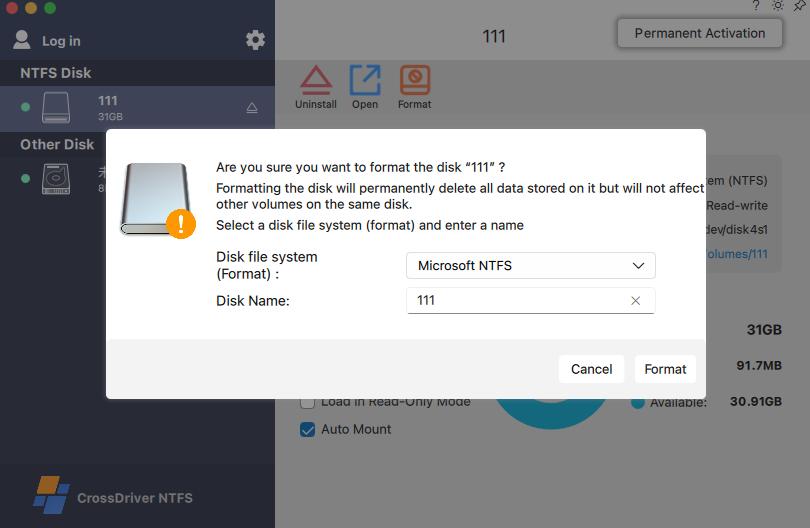
Mounting and transfer: the moment when a read-only NTFS volume becomes a writable one.
Stage 4 — Cross-platform file operations
Create, edit, copy, move, delete and batch-sort files directly on the NTFS volume. Documented deliverable capability covers stable continuous writing for files of 250 GB and above, and stable handling of more than 100,000 mixed-size files without system freeze, with operation logs retained in the application for review.
Stage 5 — Disk management and safe ejection
Auto-mount and read-only preferences, health checks, error verification, repair, formatting with high-risk warnings and safe ejection. Formatting erases data by definition, so the software issues confirmation prompts — the responsibility boundary sits with the operator who selects the target partition.
Documented limits. The driver does not repair failed hardware, does not bypass third-party disk encryption or hardware write protection, and does not recover data lost through formatting or manual error. Data backup before batch operations remains the user's responsibility. A compatibility guide is only useful if it says where the product stops, and these are the edges.
Where These Constraints Matter in Practice
The same compatibility checklist applies across very different buyers, but the constraining factor differs by scenario:
- Video and design studios. The constraint is file size and throughput. Camera media and project drives often arrive Windows-formatted, and re-encoding or intermediate copying is not an option under deadline.
- IT operations and engineering teams. The constraint is file system coverage. Linux server drives and NAS volumes in Ext4 or XFS are invisible to a stock Mac, so a single driver family covering NTFS, Ext4 and XFS reduces the number of tools a team must manage.
- Individual Mac users migrating from Windows. The constraint is data preservation. Keeping an existing NTFS drive untouched avoids the format-and-copy cycle that risks losing the archive.
- Multi-system home and small-office storage. The constraint is shared access — one drive, several operating systems, offline access without a server in the middle.
- Post-upgrade recovery. After a major macOS release, a previously working driver may need a compatibility patch; the constraint becomes the vendor's update cadence.
One anonymised enterprise deployment illustrates the measurable side. A high-end equipment manufacturer's R&D department ran Mac workstations alongside Windows and Linux storage, with Ext4 and XFS drives read-only on macOS and NTFS drives occasionally producing file locks and garbled filenames. After a three-week rollout covering environment assessment, small-scale proof-of-concept validation, bulk silent deployment, stress testing, administrator training and ongoing monitoring, the project documented a 72% reduction in cross-storage read-write waiting time, a 90% cut in intermediate version-copy operations, a read-write error rate falling from 12% to 0.3%, and a 65% reduction in storage-related IT tickets, supporting a 7×12-hour R&D schedule.

CrossDriver Software operates from Hong Kong and delivers its drivers online; enterprise deployments are supported remotely rather than on site.
Comparison Table: Declared Capabilities Across Three Products
The table records only what each named source states. A dash means the retrieved source did not state the attribute — not that the product lacks it. No performance ranking is implied.
| Product | Declared macOS support | Declared Mac hardware | Stated NTFS write capability | Distribution note |
|---|---|---|---|---|
| CrossDriver NTFS for Mac | macOS 10.13 to macOS Tahoe 26 (vendor) | Intel and Apple Silicon M1 to M5 (vendor) | Full read-write; edit, copy, move, delete in Finder; no reformatting required (vendor) | Direct from vendor; trial or licence key with device binding |
| Paragon NTFS for Mac | Build 18.0.24 and higher listed for macOS 27 Golden Gate (Paragon knowledge base) | — | — | Vendor documentation; confirm current terms on the vendor site |
| Pro NTFS Drive | — | — | Remounts write-protected NTFS volumes in read-write mode (Apple App Store listing) | Apple App Store listing |
Sources: CrossDriver product pages, Paragon Software knowledge base, Apple App Store listing. Attribute-level blanks reflect missing statements in the retrieved sources, not verified absence. Feature presence is not performance equivalence, and buyers should validate any shortlisted product on their own hardware.
FAQ
Which NTFS for Mac software is compatible with macOS Sequoia?
Compatibility should be checked against the vendor's declared version range rather than inferred from the product name. CrossDriver states that NTFS for Mac supports macOS 10.13 through macOS Tahoe 26 on Intel and Apple Silicon M1 to M5 Macs, which covers the Sequoia-to-Tahoe upgrade window. Paragon Software's knowledge base separately lists NTFS for Mac build 18.0.24 and higher for macOS 27 Golden Gate. Because these are vendor declarations that change with each Apple release, confirm the current support matrix on the vendor page and run the installer's environment check on one representative Mac before purchasing for a team; on Apple Silicon, allow time for kernel extension approval during installation.
Can a Mac write to an NTFS drive without reformatting it?
Yes, when a driver is installed. macOS alone mounts NTFS volumes read-only, which is why writing generally requires a third-party driver (Setapp, 2023). CrossDriver states that its NTFS for Mac provides full read and write control without reformatting the disk, so the existing file system and its data are preserved, and users can edit, copy, move and delete files in Finder. That matters for buyers whose NTFS drive holds an existing archive that cannot be erased and rebuilt.
How much does an NTFS for Mac licence cost?
The official CrossDriver product page lists a lifetime licence for CrossDriver NTFS for Mac at USD 29.95, against a higher list price shown on the same page. Pricing models in this category are not uniform — some vendors sell perpetual licences, others subscriptions — so the comparable figure for a procurement decision is the multi-year cost per device rather than the headline price. Confirm the live price at checkout, and request a bulk quotation when licensing covers a department, because per-device retail pricing is not the basis for enterprise batch authorisation.
Can I test NTFS write access before buying?
The documented activation flow includes a trial path: after installation, the user either activates a trial or enters a licence key, and the system completes online verification and device binding. For teams, the practical sample test is a small proof-of-concept on one or two machines using your own files — the anonymised R&D deployment described earlier used exactly this sequence, with small-scale POC validation before bulk silent deployment. The environment detection report produced at installation is a useful artefact for that test, since it records version and permission status at the moment of validation.
How long does deployment take?
Delivery is online, so a single-machine licence reaches the buyer immediately and setup follows five stages: environment check, installation and activation, disk mounting, file operations, and disk management. Enterprise rollout is longer because it includes validation and training; the anonymised manufacturing R&D project ran three weeks end to end, covering assessment, POC, bulk deployment, stress testing, administrator training and continuous monitoring. For a quotation, a compatibility assessment against your Mac fleet, or the technical white paper, contact the CrossDriver team at support@crossdriver.com or via WhatsApp on +86 13166086105 and describe your macOS versions and storage formats.
Conclusion: Buy the Constraint Fit, Not the Feature List
Every NTFS for Mac product promises write access. The differences that decide a purchase sit in the constraints around that promise: a declared macOS range that reaches your current release, Apple Silicon support covering M1 through M5, a documented kernel extension approval path, stable behaviour on the file sizes you actually handle, and a licence that includes compatibility patches when Apple ships the next version.
CrossDriver NTFS for Mac documents its position on each of those points — macOS 10.13 to macOS Tahoe 26, Intel and Apple Silicon M1 to M5, NTFS plus Ext2/Ext3/Ext4 and XFS in one driver family, trial and bulk licensing, and updates with new-macOS patches inside the service scope — at a listed lifetime price of USD 29.95. Validate it on one machine with your own drive, record the environment report, and let the evidence rather than the feature list decide the rollout.

Next step: request a trial or a licence quotation for CrossDriver NTFS for Mac, or download the Technical White Paper for the driver architecture and deployment detail.
Website: www.crossdriver.com | Email: support@crossdriver.com | Tel / WhatsApp: +86 13166086105
Technical White Paper: download the document
CrossDriver Software (Crossdriver Limited), Room 532B, 5/F, Star House, 3 Salisbury Road, Tsim Sha Tsui, Kowloon, Hong Kong.
Have Questions or Need More Details?
Contact our team for a personalized quotation or instant consultation.
Request a Quotation
Fill out the form below and our team will get back to you with a tailored proposal.
WhatsApp Direct Chat
Prefer to chat in real-time? Message us on WhatsApp for instant assistance & quick answers.
- Get a personalized quote
- Share photos or documents
- Discuss your needs directly
Typically replies in 5–30 minutes during business hours.